


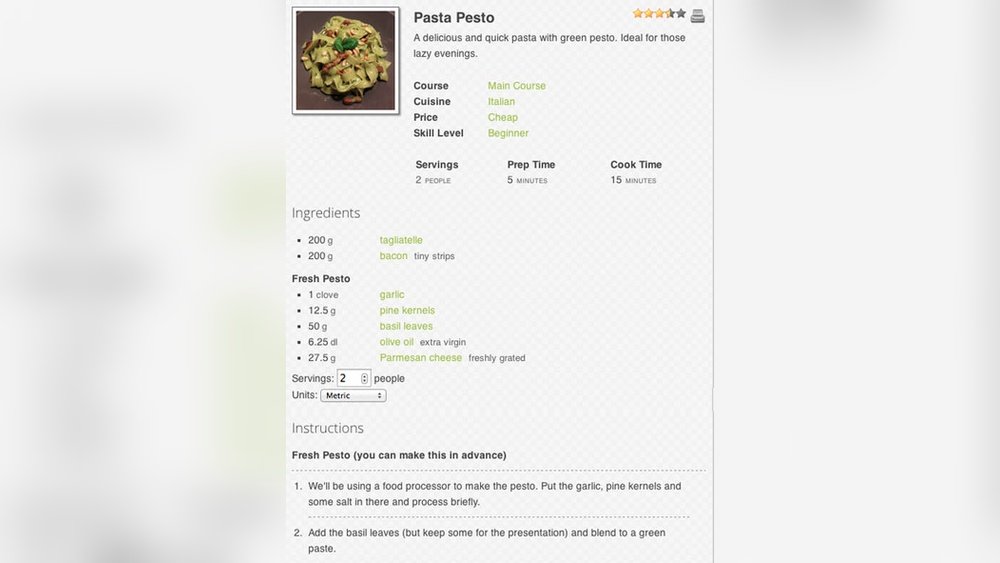
Are you looking for a simple way to share your favorite recipes online? Wp Ultimate Recipe is the perfect tool to help you create beautiful, easy-to-read recipe posts on your WordPress site.
Whether you’re a food blogger, chef, or just love cooking, this plugin makes your recipes stand out and keeps your readers coming back for more. Keep reading to discover how Wp Ultimate Recipe can transform your website and make sharing your culinary creations a breeze.
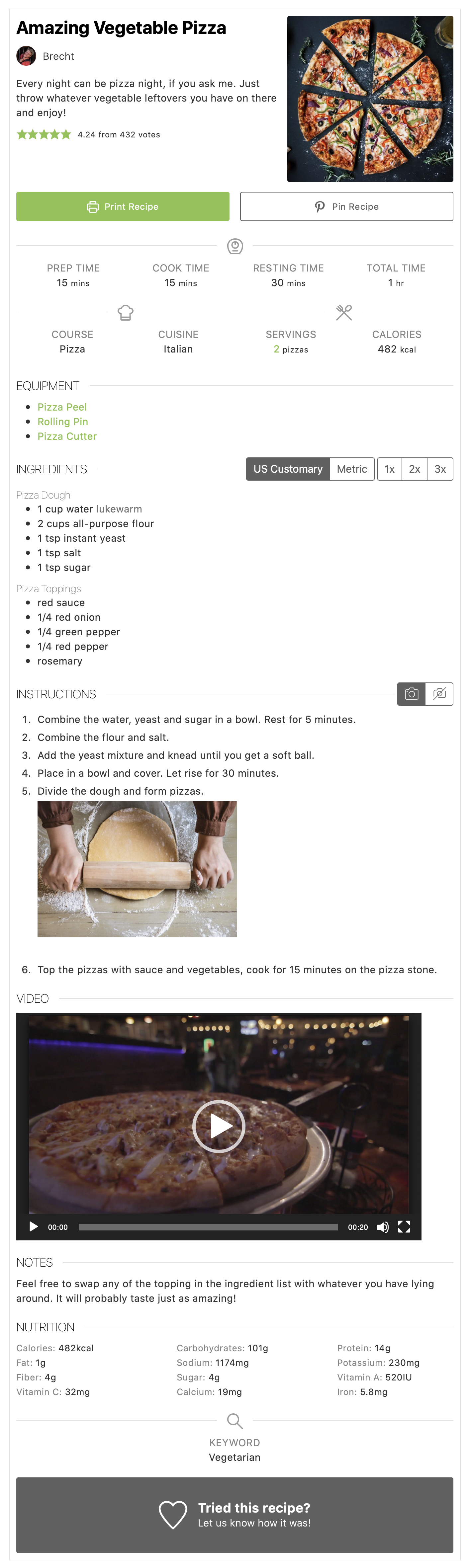
Credit: wordpress.org
Wp Ultimate Recipe Features
Wp Ultimate Recipe offers a range of features designed to create clear and attractive recipes. These features help users organize and share recipes easily. Each function focuses on making recipe presentation simple and user-friendly.
Recipe Templates
Wp Ultimate Recipe includes ready-made templates for quick setup. Templates keep recipes uniform and neat. Users can choose layouts that suit different dish types. This saves time and creates a professional look.
Ingredient Management
Manage ingredients with ease using this feature. Ingredients list can be added, edited, and categorized quickly. It supports quantities and units for accuracy. This helps readers follow recipes without confusion.
Step-by-step Instructions
Instructions are broken into clear, simple steps. Each step guides the reader through the cooking process. This structure makes recipes easy to follow. Users can add photos or tips for extra help.
Nutritional Information
Wp Ultimate Recipe allows adding nutrition facts for each dish. Calories, fats, proteins, and more can be shown. This helps health-conscious readers make better choices. Nutrition info is displayed in a clean format.
User Ratings And Reviews
Visitors can rate and review recipes directly on the site. This feature builds trust and interaction. Feedback helps improve recipes over time. Ratings appear clearly, guiding others in their choice.
Setting Up Wp Ultimate Recipe
Setting up Wp Ultimate Recipe is simple and fast. This plugin helps you add recipes to your site easily. Follow the steps below to get started and make your recipes look great.
Installation Process
First, log in to your WordPress dashboard. Go to Plugins and click Add New. Type “Wp Ultimate Recipe” in the search box. Find the plugin and click Install Now. After installation, click Activate. The plugin is now ready to use.
Basic Configuration
Go to the plugin settings from your dashboard. Set your preferred units for ingredients, like grams or cups. Choose how recipes will be displayed on your site. Add your email if you want to receive updates. Save your settings to apply changes.
Customizing Appearance
Navigate to the Appearance tab in the plugin settings. Pick a style that matches your website theme. Adjust colors and fonts to make recipes easy to read. Upload your logo or header image for branding. Preview your changes before saving them.
Enhancing User Experience
Enhancing user experience is key to making recipe websites enjoyable and easy to use. WP Ultimate Recipe focuses on this by offering features that help visitors find recipes quickly and interact smoothly. These features keep users engaged and coming back for more.
Search And Filtering Options
Finding the right recipe should be simple. WP Ultimate Recipe offers clear search tools. Users can search by ingredients, cooking time, or recipe type. Filters narrow down results fast. This saves time and reduces frustration.
Print And Share Features
Many visitors like to save or share recipes. WP Ultimate Recipe makes printing easy with clean, readable formats. Sharing on social media or via email is simple too. These features help recipes reach more people.
Mobile Responsiveness
More users access recipes on phones or tablets. WP Ultimate Recipe ensures recipes look good on all screens. Text, images, and buttons adjust smoothly. This helps users read and navigate without trouble.
Integrating With Other Plugins
Wp Ultimate Recipe works well with many other WordPress plugins. This makes your site more powerful and easier to use. Connecting with other tools helps you reach more visitors and improve your recipes’ visibility. It also enhances user experience and site functionality.
Seo Optimization Plugins
Wp Ultimate Recipe integrates smoothly with SEO plugins like Yoast SEO and All in One SEO. These tools help improve your recipe pages’ search rankings. They optimize titles, descriptions, and keywords without extra effort. Your recipes get better chances to appear in search results. This drives more organic traffic to your website.
Social Media Tools
Sharing recipes on social media becomes simple with Wp Ultimate Recipe. It supports plugins that add social share buttons to your posts. Visitors can easily share their favorite recipes on Facebook, Twitter, and Pinterest. This increases recipe exposure and attracts new readers. Social tools also encourage community interaction around your content.
E-commerce Integration
Wp Ultimate Recipe connects with popular e-commerce plugins like WooCommerce. This allows you to sell cooking products or ingredients directly from your site. You can create a seamless shopping experience for your visitors. E-commerce features help monetize your recipe blog easily. Managing orders and payments stays simple and secure.
Tips For Creating Engaging Recipes
Creating recipes that people enjoy and follow easily is key to a good cooking blog. Clear instructions, good pictures, and helpful videos make recipes more engaging. These tips help your readers cook with confidence and come back for more.
Writing Clear Instructions
Use simple words and short sentences. Break steps into small, easy parts. Avoid cooking jargon that can confuse readers. Write in the active voice to keep instructions direct. Number each step to guide readers smoothly through the recipe.
Using High-quality Images
Good photos show what the dish looks like at each stage. Use natural light to make colors pop. Take close-up shots of important steps. Clear images build trust and inspire readers to try your recipe.
Incorporating Video Tutorials
Videos help explain tricky parts better than text. Keep videos short and focused on key steps. Show techniques and cooking tips clearly. Videos make your recipe more interactive and easy to follow.

Credit: www.hostgator.com
Troubleshooting Common Issues
Troubleshooting common issues with WP Ultimate Recipe can help keep your site running smoothly. This section covers simple fixes for usual problems. Follow these tips to improve your experience.
Plugin Conflicts
Some plugins may not work well together. This can cause errors or stop WP Ultimate Recipe from working. Deactivate other plugins one by one to find the problem. Clear your cache after each change. Once you find the conflicting plugin, check for updates or look for alternatives.
Performance Optimization
Large recipe collections can slow down your site. Use caching plugins to speed up loading times. Compress images to reduce file size without losing quality. Limit the number of active recipes shown on each page. This helps pages load faster and improves user experience.
Regular Updates And Maintenance
Keep WP Ultimate Recipe updated to avoid bugs and security issues. Regularly check for plugin updates in your WordPress dashboard. Backup your site before applying updates. Clean out old recipes and unused data to keep your database healthy. Routine maintenance ensures smooth performance over time.

Credit: wpsheeteditor.com
Frequently Asked Questions
What Is Wp Ultimate Recipe Plugin?
WP Ultimate Recipe is a WordPress plugin designed to create, manage, and display recipes easily on your website. It offers user-friendly tools for adding ingredients, instructions, and photos. This plugin helps improve recipe presentation and SEO, making your food blog more attractive and engaging.
How Do I Add Recipes Using Wp Ultimate Recipe?
To add recipes, install and activate the plugin, then use the recipe editor. Enter ingredients, steps, photos, and cooking time. You can customize the layout and categories to organize recipes efficiently. The plugin automatically formats recipes for a clean, professional look on your site.
Can Wp Ultimate Recipe Improve Seo For Food Blogs?
Yes, WP Ultimate Recipe improves SEO by using structured data markup. It helps search engines understand recipe content better, enhancing visibility in search results. The plugin also supports keyword optimization and fast loading, which boosts your blog’s ranking and attracts more visitors.
Is Wp Ultimate Recipe Compatible With All WordPress Themes?
WP Ultimate Recipe is compatible with most WordPress themes. It integrates smoothly without disrupting site design or functionality. However, for best results, use themes optimized for food blogs or recipes. Always check for theme conflicts before full implementation to ensure seamless performance.
Conclusion
Wp Ultimate Recipe helps you share recipes with ease. It offers simple tools to create clear, neat recipe posts. Visitors can quickly find what they want and follow your recipes. The plugin supports images, videos, and step-by-step instructions. This makes cooking fun and stress-free for everyone.
Try it to make your food blog more useful and enjoyable. Your readers will appreciate the easy access to great recipes. Simple, effective, and user-friendly — Wp Ultimate Recipe fits well with any site.
